






Understanding Pixel Pitch: How to Choose the Right Resolution for Your LED Screen
If you’re shopping for a direct-view LED display, one spec will shape almost every other decision you make: pixel pitch. It determines how sharp your image looks, how much the screen costs, and ultimately how good your return on investment will be.
Pixel pitch measures the distance between individual diode clusters on an LED panel. A smaller number means the pixels sit closer together, producing a sharper image at close range — but it also means more hardware packed into the same space, which drives up cost. Get the pitch wrong and you either overpay for resolution nobody will ever notice, or install a screen that looks pixelated from the seats people actually sit in.
This guide breaks down what pixel pitch means in practical terms, how to calculate the right viewing distance, and how to strike the right balance between clarity and budget. For a full breakdown of hardware options and pricing, see our complete guide, LED Screens for Sale: Everything You Need to Know.
What Is Pixel Pitch? The Technical Basics
Pixel pitch is measured in millimeters, and it refers to the center-to-center distance between one diode cluster and the next. A “P2.5” screen has 2.5mm between pixel centers; a “P10” screen has 10mm between them.
The relationship is simple but important: the smaller the pitch, the more diodes are packed into every square meter of the display, and the higher the resolution per square foot. A P1.5 screen crams in dramatically more pixels than a P10 screen of the same physical size — which is why fine-pitch displays cost significantly more per square meter.
| Pixel Pitch | Diode Density | Optimal Viewing Distance | Primary Use Case |
|---|---|---|---|
| P1.5 | Very high | 1.5–5 m | Broadcast studios, control rooms, boardrooms |
| P2.5 | High | 2.5–8 m | Retail displays, corporate lobbies, conference rooms |
| P3.91 | Medium | 4–12 m | Indoor stages, event backdrops, rental screens |
| P6.67 | Medium-low | 6.5–20 m | Outdoor billboards, mid-size stadium screens |
Calculating Optimal Viewing Distance
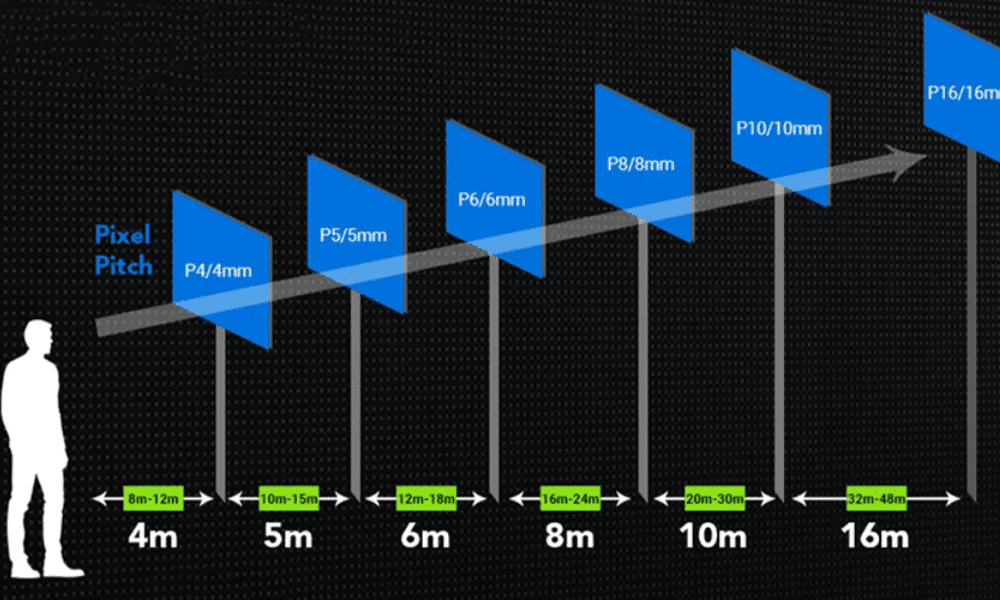
A widely used rule of thumb in the LED industry is 1 meter of viewing distance for every 1mm of pixel pitch. So a P4 screen looks its best starting around 4 meters back; a P10 screen needs roughly 10 meters before the image resolves into a clean picture instead of visible dots.
- Minimum viewing distance: the closest a viewer can stand before individual pixels become distracting.
- Optimal viewing distance: the distance at which the image looks fully resolved and natural, with comfortable margin.
Content type matters too. Static text and simple graphics are far less forgiving of a coarse pitch than full-motion, high-definition video, where the eye blends pixels together more easily.
Indoor vs. Outdoor Pixel Pitch Standards
- Indoor Applications: ultra-fine pitch (P1.2 to P2.5) is required for boardrooms, broadcast sets, and command centers, where viewers sit just a few meters away.
- Outdoor Applications: wider pitch (P6.67 to P10) is sufficient for billboards, stadiums, and highway signage, viewed from tens of meters away.
Pitch vs. Price: Finding the Sweet Spot
Cost Reality Check: Cutting pixel pitch in half can roughly quadruple the number of diodes packed into the same panel — which can quadruple cabinet costs in turn. Choose a pitch matched to your actual viewing distance, not the finest one available.
The most common buying mistake is over-specifying resolution — choosing a finer pitch than the venue actually requires, then having little budget left for processing hardware, mounting structure, or a service plan that keeps the system reliable for years.
Conclusion & Next Steps
Before choosing a display, walk your venue and honestly estimate how close your closest regular viewer will stand. Match that distance to a pitch using the 1m-per-1mm guideline, confirm indoor vs. outdoor requirements, and only go finer than necessary if your content genuinely demands it.
- Measure your minimum expected viewing distance
- Match it to a pixel pitch using the 1mm-per-meter rule
- Confirm indoor vs. outdoor brightness and pitch requirements
- Reserve budget for processing hardware, not just panel resolution
For full pricing, hardware options, and installation details, check out our complete guide: LED Screens for Sale: Everything You Need to Know.