






LED Screen Controllers 101: NovaStar, Signal Routing, and Resolution Mapping
An LED screen is only as good as the processor feeding it. You can invest in the finest pixel pitch and the most durable cabinets on the market, but if the signal chain behind the panel is misconfigured or underpowered, the final image will disappoint.
Standard displays — monitors, TVs, projectors — receive a simple HDMI or DisplayPort signal and show it directly. LED walls work differently: the video source has to be converted and mapped, pixel by pixel, across potentially dozens of individual cabinets, delivered over Ethernet/CAT6 rather than a single display cable. Understanding this signal chain is essential to speccing a system that actually performs.
Core Components of an LED Display Control System
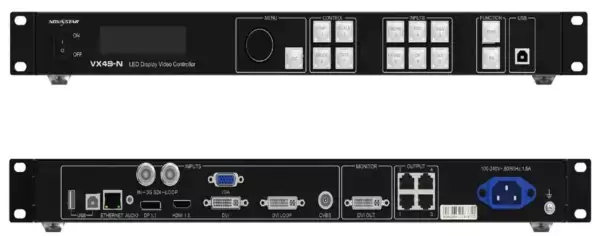
- Sending Boxes / Processors: take a media source — a laptop, media server, or broadcast feed — and convert it into the LED control data the wall understands. Popular options include the NovaStar VX series and Colorlight processors.
- Receiving Cards: installed inside each cabinet, translating the incoming signal data into instructions for the physical diodes — the last step before the image lights up.
- Network Cabling & Bandwidth: a standard Gigabit CAT6 Ethernet connection has real limits — roughly 650,000 pixels at 60Hz per port. Large or high-resolution walls need multiple ports, properly load-balanced.
Bandwidth Warning: Undersizing your CAT6 bandwidth for the wall’s total pixel count is one of the most common causes of stutter, tearing, or partial updates on a finished installation.
Pixel Mapping & Cabinet Configuration
Every LED wall needs a configuration file — commonly a .rcfg or .snl file — that tells the system exactly how the physical cabinets are arranged: how many rows and columns, which cabinet sits where, and how each receiving card maps back to the sending box’s output.
From there, installers set up the resolution canvas — 1080p, 4K, or a custom aspect ratio matched to the actual physical dimensions of the assembled wall — so content displays at the correct scale rather than stretched or cropped.
Refresh rate is another configuration detail that matters more than it might seem. A refresh rate around 3,840 Hz is often used specifically to prevent flicker when the screen is being filmed by a camera — a critical setting for broadcast, concerts, or any event where the display will appear on camera as well as in person.
Synchronous vs. Asynchronous Control Systems
- Synchronous: takes a live HDMI (or similar) input feed in real time — the standard setup for live broadcasts, concerts, and events.
- Asynchronous: uses cloud-managed media players (the Taurus series is a common example) that store and play scheduled content independently, without needing a live feed — the standard approach for digital signage.
Conclusion
Matching the right processor to your display size and use case is what turns a good LED panel into a reliable, professional installation. Undersized bandwidth, a mismatched sending box, or the wrong sync mode can undermine even the best hardware.
To plan a complete display system — from pixel pitch through processing hardware — see our full guide: LED Screens for Sale: Everything You Need to Know.